Nano Banana 2 Is Not a Prompting Trick. It Is a Visual Production System.
A Tasawom operating guide for using Nano Banana 2 with structured prompts, reference anchors, surgical edits, cinematic keyframes, and production-grade visual workflows.
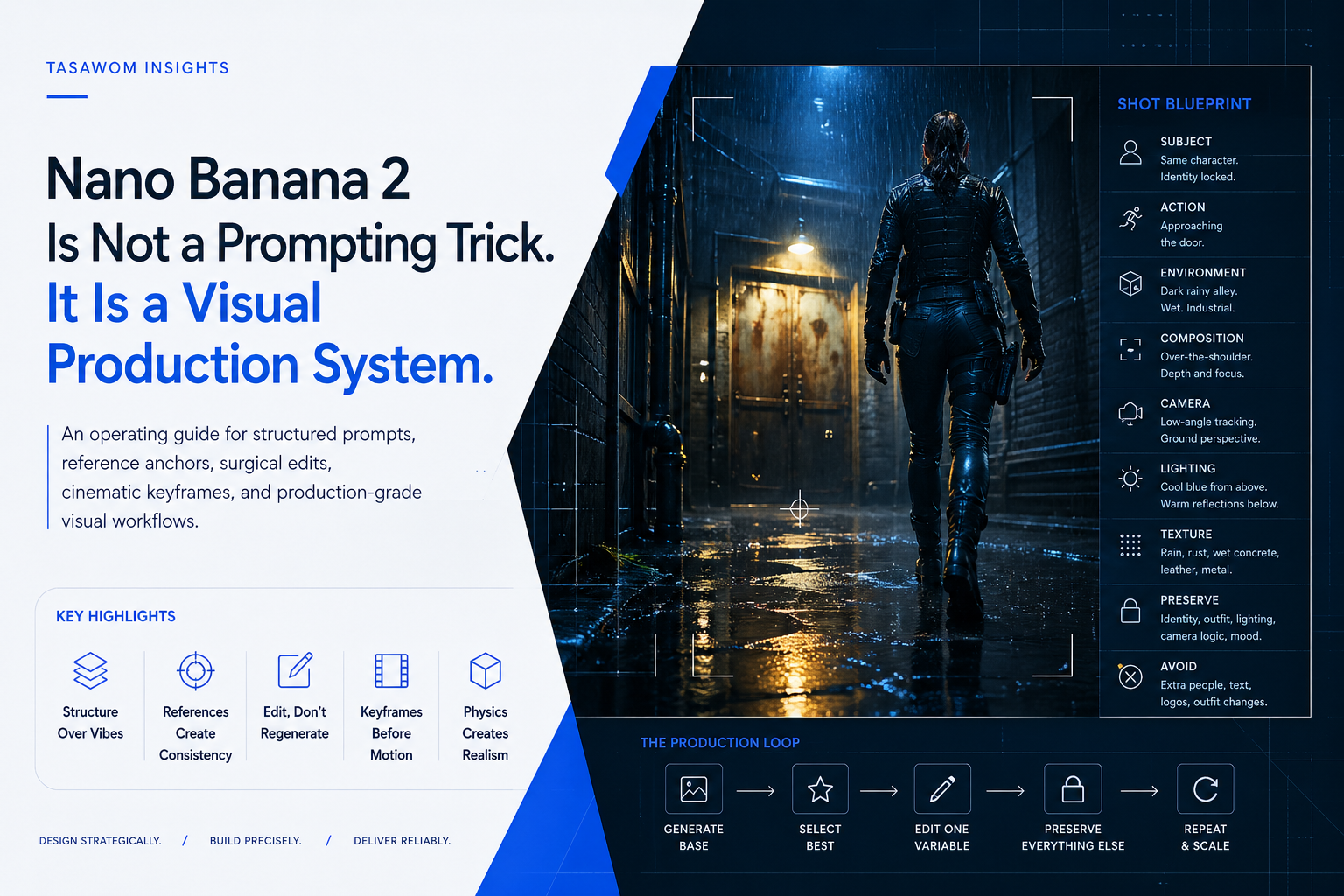
AI image generation fails when teams treat it like a slot machine.
They write a dramatic sentence, add “cinematic,” “4K,” and “ultra realistic,” then wait for the model to guess the business, visual, and production logic behind the asset.
That workflow does not scale.
Nano Banana 2 becomes useful when you stop treating it as a magic image generator and start operating it as a controllable visual production system. The difference matters. One produces random images. The other produces repeatable assets that can support campaigns, product pages, cinematic sequences, pitch decks, ads, and internal creative pipelines.
The strategic shift is simple:
Do not ask the model for an image.
Build the shot.
Key Highlights
-
Prompting is not the operating system. Structure is. A strong Nano Banana 2 workflow defines subject, action, environment, composition, lighting, camera, texture, preservation rules, and avoid rules before generation begins.
-
Consistency comes from references, not hope. Character identity, product fidelity, environment continuity, and brand style all need anchors. The model does not “remember” because you want it to. You feed it memory through references.
-
Editing beats blind regeneration. The strongest outputs usually come from a controlled loop: generate a base, select the best result, edit one variable, preserve everything else, repeat.
-
Cinematic workflows need start and end frames. Do not ask a video model to invent identity, costume, lighting, camera movement, environment, and action in one pass. Give it controlled visual states and a clear motion delta.
-
Realism comes from physics. Rust, leather, wet concrete, glass, skin, fabric, metal, and rain need material behavior. “4K” does not create realism. Physical detail does.
The Bottleneck: Vibe Prompting Creates Visual Debt
Most teams do not have an image generation problem.
They have a visual operations problem.
The prompt is not documented. The references are inconsistent. The brand style changes from one output to the next. Product details drift. Human identity changes between frames. Environments regenerate instead of evolving. Edits destroy useful parts of the image because the instruction says “make it better” instead of “change only this.”
This creates visual debt.
Visual debt is the accumulation of uncontrolled creative outputs that look impressive individually but fail as a system. One image works. The next one breaks continuity. A product ad looks strong, but the label mutates. A character frame feels cinematic, but the outfit changes. A storyboard has energy, but every shot feels like it came from a different production.
That is not a model limitation alone. It is an operating limitation.
A business cannot build serious output on random prompting. It needs a repeatable production method.
Why Traditional Prompting Fails
Traditional prompting usually fails for four reasons.
1. It describes mood instead of structure
“Make it cinematic” does not define a shot.
Cinematic compared to what? A close-up? A wide shot? A handheld frame? A clean studio key visual? A dark alley sequence? A product reveal? A fashion editorial?
A model cannot execute a production intention if the instruction only describes emotional flavor.
2. It gives the model too much freedom
Every missing detail becomes a decision the model must make.
If you do not specify the outfit, the model may redesign it. If you do not specify the camera, the model may change the angle. If you do not specify the background, the model may invent new elements. If you do not specify what to preserve, the model may treat the whole image as disposable.
The model fills gaps. That is useful for exploration. It is dangerous for production.
3. It mixes too many changes in one pass
A prompt that changes the character, background, lighting, pose, camera, outfit, and style at the same time creates too many failure points.
When the output fails, you cannot diagnose why.
Was the reference weak? Was the camera unclear? Was the action too complex? Did the lighting conflict with the environment? Did the avoid list miss a known drift pattern?
A controlled workflow isolates variables.
4. It ignores continuity
Most image generation systems can create impressive single frames. Serious production requires continuity across frames.
Continuity means the character remains the same. The outfit remains the same. The world follows the same lighting logic. The product keeps its geometry. The camera angle changes intentionally. The environment evolves, not regenerates randomly.
Continuity is not a prompt decoration. It is the backbone of scalable visual production.
The Tasawom View: Treat Image Generation Like a System
At Tasawom, we do not see tools as isolated tricks. We see them as operating layers.
A production-grade image workflow needs the same logic as a software system:
- inputs
- constraints
- references
- state
- rules
- iteration loops
- quality checks
- failure diagnosis
- repeatable outputs
Nano Banana 2 can move fast. But speed without structure creates rework. The goal is not to generate more images. The goal is to reduce creative chaos and produce usable assets with less waste.
That means the operator must define the system before the model generates.
The Production Prompt Framework
A serious Nano Banana 2 prompt should include nine sections.
1. Subject
Define who or what appears in the image.
Do not write: “a woman in an alley.”
Write: “same character from the reference, preserving exact face, hairstyle, body proportions, zipped tactical vest, gloves, and boots.”
The subject section locks identity and core visual traits.
2. Action
Define what the subject is doing.
Action should be visible and physically possible.
Weak: “standing dramatically.” Strong: “approaching a rusted industrial steel door, right hand slightly raised toward the handle, shoulders forward, walking through rain.”
Action creates narrative direction.
3. Environment
Define the world.
Include location, weather, surfaces, atmosphere, and background logic.
Example: “dark rainy alley with wet concrete, narrow industrial walls, puddles, yellow street reflections, rusted steel door ahead, no readable signs.”
Environment prevents the model from inventing a new world every time.
4. Composition
Define the frame.
Use shot type, angle, foreground, midground, background, subject placement, and visual hierarchy.
Example: “over-the-shoulder shot from behind, shoulder and head silhouette in the foreground, rusted door centered in the midground, alley depth behind the door edges.”
Composition gives the model a camera plan.
5. Camera
Define lens feel and perspective.
Use terms like low-angle macro, medium side-profile, wide establishing shot, close-up portrait, tracking-style frame, reverse-angle view, compressed telephoto feel, or shallow depth of field.
Camera language reduces accidental framing changes.
6. Lighting
Define the lighting system, not just the mood.
Weak: “dramatic lighting.” Strong: “cold blue rain light from above, faint warm yellow reflection from wet concrete below, soft rim light along the jacket edge, wet metal catching small highlights, shadows falling toward camera right.”
Lighting needs direction, color, source, reflection, and shadow behavior.
7. Texture
Realism lives in material details.
Use scuffed leather, wet concrete, rust, peeling paint, rivets, rain droplets, puddle splash, fabric wrinkles, skin texture, glass glare, metal scratches, dust, and contact shadows.
Texture makes the image feel physically grounded.
8. Preserve Rules
This is the lock.
State what must remain unchanged.
Example: “Preserve exact character identity, zipped tactical vest, gloves, boots, hairstyle, body proportions, rainy alley continuity, lighting direction, depth of field, and cinematic color grade.”
Preserve rules protect the asset from unwanted regeneration.
9. Avoid Rules
This is the guardrail.
State what commonly breaks.
Example: “Avoid unzipped vest, added hood, extra people, readable signs, logos, watermarks, changed outfit, distorted hands, plastic skin, random props, or new background architecture.”
Avoid rules reduce predictable drift.
The Difference Between a Prompt and a Production Instruction
A weak prompt asks:
“Create a cinematic woman in a rainy alley.”
A production instruction says:
“Create a 16:9 4K photorealistic cinematic keyframe. Subject: same character from the reference, preserving exact face, hairstyle, body proportions, zipped tactical vest, gloves, and boots. Scene: dark rainy alley with wet concrete and yellow street reflections. Composition: low-angle tracking-style shot from ground level, boot dominant in foreground. Lighting: cool blue rain highlights from above, warm yellow reflection from below. Texture: scuffed leather, wet concrete, puddle splash, rain droplets. Preserve: exact identity, wardrobe, camera logic, rainy alley continuity. Avoid: changed outfit, extra people, readable signs, logos, watermarks.”
That is not longer for the sake of being longer.
It transfers decision-making from the model to the operator.
Pro-Tip: Use “Change Only X” as Your Editing Default
Most image edits fail because the instruction gives the model permission to rebuild the image.
Avoid vague edit language:
- “Improve this.”
- “Make it more cinematic.”
- “Fix the background.”
- “Make it better.”
Use surgical language:
“Edit the uploaded image. Change only the background to a dark rainy alley. Preserve exactly: same character face, pose, outfit, camera angle, lighting direction, shadows, depth of field, color grade, and composition. Match the new background lighting to the original subject lighting. Avoid extra people, text, logos, watermarks, or identity changes.”
This creates a controlled edit boundary.
One change. Everything else locked.
References Are Operational Memory
Consistency does not come from writing “same character” once.
It comes from reference architecture.
A serious character workflow needs character DNA:
- front view
- side view
- back view
- close-up face
- wardrobe details
- footwear
- accessories
- expressions
- material details
A single headshot does not control full-body cinematic work. A front view does not control side-profile shots. A clean portrait does not control back-view continuity.
For products, build product DNA:
- hero angle
- side angle
- top angle
- label close-up
- material detail
- scale reference
- packaging reference
- usage context
For environments, build world DNA:
- establishing shot
- key background elements
- lighting direction
- surface materials
- color palette
- atmosphere
- recurring props
- spatial layout
This turns references into a visual memory layer.
Cinematic Keyframes: Build Video Before Motion
For video workflows, Nano Banana 2 should not carry the entire sequence alone.
Use it as a keyframe engine.
Create the start frame. Create the end frame. Preserve identity, clothing, lighting, and environment. Define what changes between the two frames. Then animate.
Example:
Start frame: Character stands at the alley entrance, body turned toward the rusted door.
End frame: Same character closer to the rusted door, hand raised toward the handle.
Motion prompt: Camera slowly tracks behind the character. Subject walks forward naturally. Rain continues. Lighting stays cold blue with yellow reflections. Door grows larger in frame. No outfit changes. No new people. No sudden camera jump.
This workflow separates visual control from motion control.
That separation matters because video models already need to solve temporal movement. Do not also force them to invent identity, wardrobe, environment, lighting, and camera logic from scratch.
Failure Diagnosis: Fix the System, Not the Whole Prompt
When an output fails, do not rewrite the entire prompt with more adjectives.
Diagnose the failure.
If the face changes
Strengthen the identity reference. Reduce scene complexity. Repeat the face preservation rule. Use a clearer close-up reference.
If the outfit changes
Repeat the wardrobe lock. Name specific garments. Add “do not change clothing.” Include a wardrobe reference.
If the camera refuses to reverse
Do not say “rotate 180 degrees” alone.
Say: “show the opposite side of the same alley, camera placed on the other side of the subject, reverse-angle view, background elements must be different from the previous frame while preserving rainy alley continuity.”
If objects merge or appear in the wrong place
Use physical logic.
Example: “Move the lever away from the microphone so the two controls are clearly separate and physically plausible.”
Models often perform better when the prompt explains functional intent.
If realism looks plastic
Add material behavior.
Use visible skin texture, natural asymmetry, fabric wrinkles, contact shadows, rain beads, scuffed surfaces, scratches, glare, and subtle grain.
Where Nano Banana 2 Fits in a Business Workflow
Nano Banana 2 works best when it supports a structured content pipeline.
Use it for:
- campaign concept frames
- product ad exploration
- cinematic keyframes
- social media asset systems
- pitch deck visuals
- storyboard development
- creative direction testing
- multi-reference scene building
- rapid visual iteration
- internal production alignment
Do not use it casually when the output needs exact typography, legally critical product labeling, pixel-perfect layout, or final commercial approval without human review.
Fast generation does not remove quality control. It changes where quality control must happen.
The Service-Ready Operating Checklist
Before generating, answer these questions:
-
What must remain unchanged? Identity, product design, wardrobe, layout, camera, style, lighting, or environment?
-
What is the single intended change? Background, action, angle, expression, object placement, lighting, or material?
-
What references control the result? Character, product, world, style, object, or previous frame?
-
What failure patterns must the prompt block? Extra people, changed clothing, added text, distorted hands, logo drift, random signs, wrong angle?
-
How will the output enter production? Social asset, ad concept, storyboard, product visual, website section, pitch deck, or video keyframe?
These questions turn image generation into an accountable workflow.
The Real Operator Mindset
A good Nano Banana 2 user is not just a prompt writer.
They act as:
- Director: controls shot, action, and visual hierarchy.
- Designer: controls style, composition, and brand logic.
- Editor: changes only what needs to change.
- Continuity supervisor: preserves identity, environment, and material consistency.
- Operator: converts outputs into scalable assets.
That is the difference between “AI image generation” and a visual production system.
Final Takeaways
Implement these immediately:
-
Replace vibe prompts with structured production instructions. Use subject, action, environment, composition, camera, lighting, texture, preserve, and avoid sections.
-
Build reference libraries before scaling output. Create character DNA, product DNA, and world DNA for any recurring visual system.
-
Edit surgically. Change one variable at a time. Preserve everything else explicitly.
-
Use start and end frames for motion. Control the visual states before asking a video model to animate them.
-
Diagnose failures by category. Identity drift, wardrobe drift, camera drift, object placement, lighting inconsistency, and material realism each need different fixes.
Nano Banana 2 does not reward random prompting at scale.
It rewards operators who design the workflow.
If your business needs AI-generated visuals that support campaigns, products, content systems, or cinematic production pipelines, do not build on prompts alone.
Build the system.
Start a Strategic Conversation with Tasawom to turn fragmented workflows into production-grade systems—or Explore our Featured Projects to see how execution-layer engineering moves from strategy to shipped software.