Automation Discovery: Stop Selling AI Before You See the Workflow
A Tasawom operating guide on why automation starts with operator access, workflow observation, and small pain fixes—not niche guessing, tool pitching, or vague AI promises.
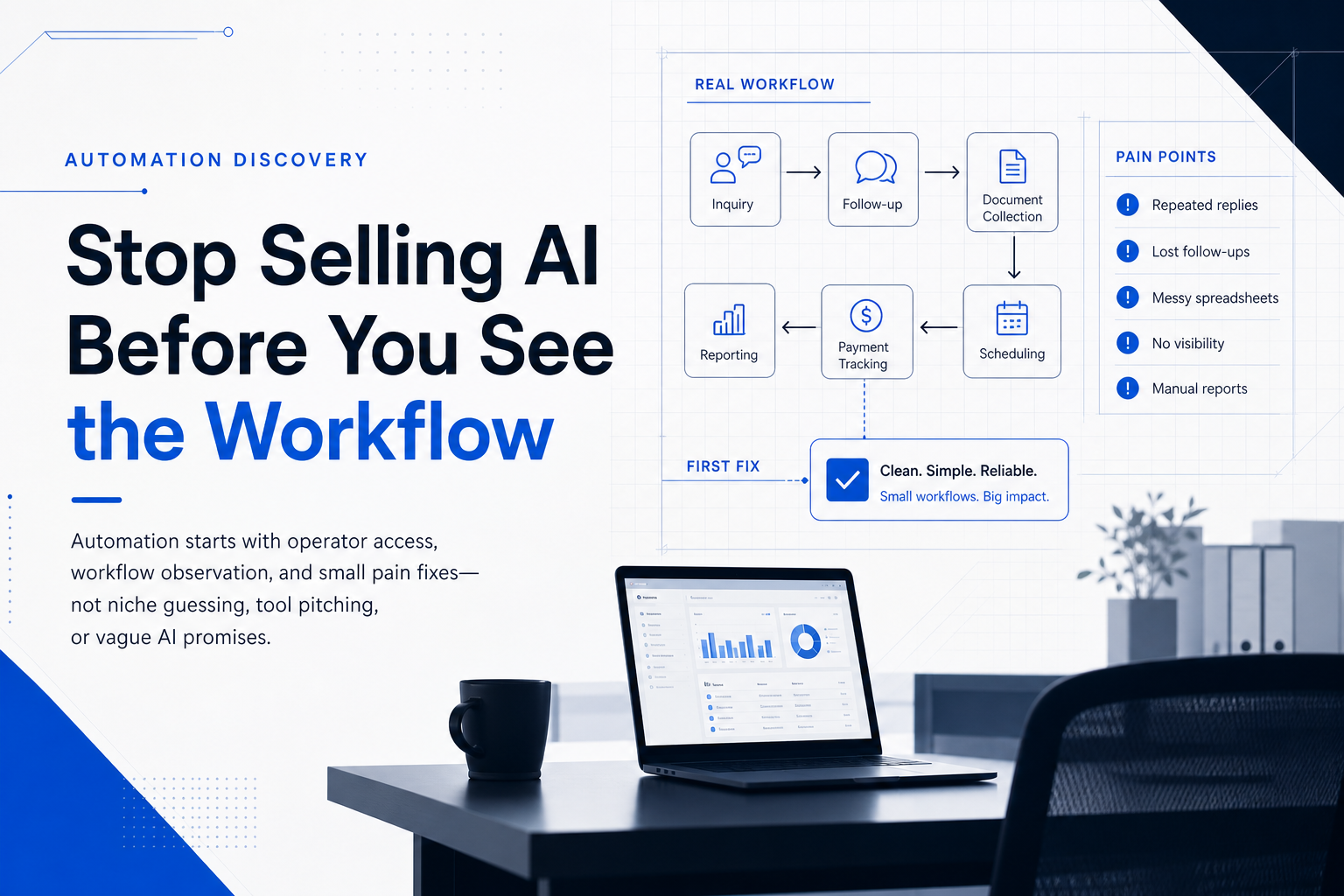
The business does not need “AI automation” first.
It needs someone close enough to the work to see where the work breaks.
That distinction matters. Many automation conversations start too late in the sequence. A founder, manager, or technical team jumps directly into tools: chatbots, agents, CRM integrations, booking systems, dashboards, Make scenarios, Zapier flows, custom portals. The vocabulary sounds advanced. The work behind it stays invisible.
Then the project stalls.
Not because automation lacks value. The research points in the opposite direction. McKinsey estimates that activities representing up to 30 percent of current work hours in the US economy could become automated by 2030, with office support and customer service among the most exposed categories. (McKinsey & Company) The problem is not whether repetitive administrative work exists. The problem is whether the team can see it clearly enough to design the right intervention.
Most failed automation discovery begins with a false question:
“Which niche should we automate?”
The better question is:
“Where can we get close enough to real operators to observe repeated pain?”
Tasawom’s position is simple: automation should not begin with a pitch. It should begin with access.
Key Highlights
- Automation discovery is an access problem before it becomes a technical problem. You cannot automate a workflow you have not observed.
- The first product is not AI. The first product is operational clarity: a cleaned workflow, a tracker, a template system, a form, or a simple reporting loop.
- The best entry point is boring work. WhatsApp follow-ups, appointment reminders, document collection, payment tracking, repeated replies, and messy spreadsheets reveal more commercial signal than abstract “digital transformation” conversations.
- Small workflow fixes create better strategy than big discovery decks. A seven-day cleanup exposes constraints, adoption friction, staff behavior, data quality, and willingness to pay.
- Operator access compounds. Ten workflow conversations produce a clearer market map than one month of niche research from outside the building.
The real bottleneck: you are outside the workflow
When “automate business workflows” sounds empty, the phrase is not the problem. Distance is the problem.
From outside the business, every workflow looks generic. A clinic “needs reminders.” A shop “needs order tracking.” A real estate office “needs follow-up.” A training center “needs a CRM.” Those statements do not contain enough operational truth to build anything useful.
Inside the business, the problem changes shape:
- The secretary confirms appointments from three WhatsApp chats and a notebook.
- The doctor asks for patient photos, but nobody tracks who sent what.
- A lead asks for the price, disappears, then returns after two weeks with no context.
- A customer sends a receipt, but the payment status stays in someone’s head.
- The owner asks for weekly sales, and the team reconstructs the report manually from scattered messages.
- Staff answer the same five questions every day, but no one has written the answer bank.
This is where automation discovery starts.
AHRQ’s workflow mapping guidance defines a workflow diagram as a way to show the movement of people, materials, and information through a process, exposing redundant motion and inefficiency. (digital.ahrq.gov) That principle applies far beyond healthcare. A workflow only becomes fixable when someone maps how work actually moves.
Why “pick a niche” fails too early
The classic internet advice says:
Pick a niche → find pain → build offer → sell.
That sequence works only when you already have meaningful access to buyers and operators. Without access, “niche selection” becomes speculative theater.
You compare clinics, restaurants, real estate offices, training centers, travel agencies, and small factories from a distance. You imagine their pain. You imagine budgets. You imagine urgency. Then every niche looks both possible and fake.
This creates analysis paralysis because the map has no terrain.
The correct sequence for early automation discovery looks different:
Get access → observe work → extract pain → fix one small thing → convert the pattern into an offer.
This sequence protects the work from abstraction. It forces the strategist to touch the operating layer before designing the system layer.
The process mining literature supports the same logic at enterprise scale. A classic workflow-mining paper argues that organizations often face discrepancies between workflow designs and real executions, and that many workflow designs created by managers or specialists become incomplete, subjective, or too high-level. The paper proposes starting from information about workflows as they actually take place. (
) For small businesses, you may not have ERP event logs or mature systems. You still need the same discipline: observe the real process, not the imagined one.The research case for access-first automation
Automation projects fail when teams automate the visible symptom instead of the operating mechanism.
A business owner says, “We need a chatbot.” The real issue may be unclear pricing, no lead tracker, slow staff response, missing handoff rules, or no owner-level view of follow-up status. A clinic says, “We need a booking system.” The real issue may be no-show reminders, double booking behavior, unclear patient instructions, manual confirmation, or staff fear of changing the appointment routine.
The research does not support technology-first change.
AHRQ’s health IT workflow redesign work found that small and medium-sized medical practices benefit from assessing workflows before implementing health IT systems. The same source emphasizes that practices need a clear understanding of how clinical and administrative tasks happen and how those processes may change when technology enters the workflow. (digital.ahrq.gov)
OECD research on SME digitalisation makes the same constraint visible from a business-policy angle: digital technologies can strengthen SME resilience and competitiveness, but SMEs still face barriers including limited infrastructure, lack of digital skills, financial constraints, implementation costs, maintenance costs, resistance to change, and reorganisation costs. (OECD)
Those barriers explain why “AI automation” often scares small businesses. The term sounds expensive, disruptive, vague, and risky. “I will clean one repeated workflow this week” sounds concrete.
Process mining shows the enterprise version of this pattern. Harvard Business Review describes process mining as a way to analyze transactional event logs and create a detailed picture of actual process flows. (Harvard Business Review) Large companies use logs. Small companies use calls, screenshots, WhatsApp threads, spreadsheets, notebooks, and staff interviews. The principle stays the same: first reveal the workflow, then improve it.
What counts as operator access?
Operator access does not require a boardroom meeting.
It means someone lets you see work in motion.
Operator access can look like:
- A clinic secretary sharing how appointments get booked and confirmed.
- A restaurant owner showing how WhatsApp orders become kitchen tasks.
- A training center explaining how leads move from inquiry to enrollment.
- A real estate broker showing how prospects get tracked after the first call.
- A travel office showing how documents arrive, get checked, and get lost.
- A small factory showing how stock, invoices, and delivery follow-ups move between people.
- A dentist showing where patient photos, payments, and reminders break down.
The signal usually appears in simple phrases:
- “We do the same thing every day.”
- “The employee forgets.”
- “The customer keeps calling.”
- “The Excel file is messy.”
- “We do not know who paid.”
- “Everything is on WhatsApp.”
- “Nobody updates the sheet.”
- “The report takes too much time.”
- “The client sent the wrong documents again.”
Those phrases matter because they describe repeated operational drag. They reveal jobs that nobody owns cleanly, information that moves through fragile channels, and decisions that depend on memory instead of systems.
The first offer: workflow cleanup, not automation
Do not lead with “AI automation.”
Lead with a smaller, sharper promise:
“Show us one repeated messy workflow, and we will simplify it.”
This changes the buyer’s risk calculation. The business owner does not need to understand artificial intelligence, system architecture, APIs, or automation tooling. They only need to understand less headache.
A first offer can sound like this:
“We help small businesses clean up messy repeated admin work: WhatsApp follow-ups, customer tracking, bookings, Excel reports, document collection, and repeated replies. We usually start by fixing one annoying workflow, not by selling a huge system.”
This offer works because it starts where the pain lives. It does not ask the client to buy transformation. It asks the client to reveal friction.
The five pain shapes worth looking for
Automation discovery becomes easier when you stop looking for “ideas” and start looking for recurring pain shapes.
1. Repeated replies
This includes prices, availability, appointment times, location, required documents, status updates, policies, and basic FAQs.
The first fix rarely needs an AI agent. It may need:
- a WhatsApp quick-reply bank;
- a structured answer library;
- a public FAQ page;
- an intake form;
- message templates by scenario;
- a later chatbot only if volume justifies it.
Repeated replies waste attention because staff must rebuild the same answer under time pressure. A small system turns memory into reusable infrastructure.
2. Lost follow-ups
This includes leads not called back, patients not reminded, customers disappearing after first contact, payment status living in messages, and no clear second-touch routine.
The first fix may be:
- a Google Sheet lead tracker;
- a reminder column;
- follow-up status labels;
- WhatsApp follow-up templates;
- a daily follow-up dashboard;
- a simple CRM when the process proves stable.
This category creates direct revenue leakage. The business already paid to generate the lead, receive the inquiry, or attract the patient. Then the process loses the relationship.
3. Messy Excel and manual reports
This includes sales, expenses, stock, invoices, attendance, payroll inputs, weekly summaries, and customer lists.
The first fix may be:
- a cleaned sheet structure;
- controlled dropdown fields;
- one source of truth;
- a form-to-sheet intake flow;
- a weekly summary tab;
- a simple dashboard;
- basic access rules.
The goal is not to impress the client with software. The goal is to stop the business from reconstructing reality every week.
4. Booking and scheduling chaos
This includes double bookings, no-shows, manual confirmations, no reminder process, unclear rescheduling, and appointment data living across chats and notebooks.
The first fix may be:
- a booking form;
- a daily appointment sheet;
- confirmation templates;
- reminder messages;
- no-show status tracking;
- staff instructions for rescheduling.
The evidence supports starting here, especially in clinics. A Cochrane review of eight randomized controlled trials with 6,615 participants found that mobile text message reminders increased attendance at healthcare appointments compared with no reminders or postal reminders. The review also found text reminders had a similar attendance effect to phone calls and lower costs per attendance in two studies. (Cochrane)
That does not mean every clinic needs the same reminder system. It means appointment communication is a proven operational lever, and discovery should inspect how reminders actually happen before building anything.
5. Document collection hell
This includes missing IDs, receipts, patient photos, addresses, signatures, applications, invoices, contracts, and compliance files.
The first fix may be:
- a document checklist;
- an upload form;
- a client status tracker;
- a missing-document message template;
- folder naming rules;
- staff review instructions;
- automated reminders once the manual process works.
Document collection fails because the business depends on the client to complete a process the client does not understand. A good system makes the next required action visible.
The Tasawom Automation Discovery Model
Tasawom treats automation discovery as a field operation, not a brainstorming session.
The model has five moves.
1. Acquire access
Start with connectors before clients. Ask people who know operators: friends’ parents, clinic staff, dentists, small business owners, restaurant managers, real estate brokers, training centers, travel offices, printing shops, workshop owners, import/export people, and community networks.
The message should not sell automation. It should request workflow visibility:
“Do you know anyone who runs a small business where admin work is messy — orders on WhatsApp, bookings, follow-ups, Excel tracking, customer lists, invoices, or repeated questions? We are inspecting real workflows and fixing one small annoying thing at a time.”
This message removes pressure. It asks for access, not trust in a full project.
2. Observe the current workflow
Ask the operator:
“What is one task in the business that repeats every day or every week, but nobody has time to properly fix?”
Then ask:
“Can you show us how you currently do it — WhatsApp, Excel, notebook, screenshots, folders, whatever?”
The second question separates real discovery from polite conversation. The screen, sheet, chat, and notebook reveal the actual operating system.
3. Extract the pain pattern
Do not jump into solution mode. Classify the pain:
- repeated reply;
- lost follow-up;
- messy sheet;
- booking chaos;
- document collection;
- manual report;
- status visibility;
- staff handoff;
- payment tracking;
- customer intake.
Then locate the failure point:
- Where does information enter?
- Who touches it first?
- Where does it wait?
- Who forgets?
- Where does the client get confused?
- Which step causes repeated messages?
- Which decision lacks a clear owner?
- Which report requires manual reconstruction?
- What exception happens every week?
This converts a complaint into a system map.
4. Fix one small workflow
Build the smallest stable improvement.
That may be:
- a cleaned Google Sheet;
- a form connected to a sheet;
- a WhatsApp response bank;
- an appointment reminder workflow;
- a client document checklist;
- a daily follow-up board;
- a weekly dashboard;
- a folder naming system;
- a lightweight CRM;
- a Make/Zapier connection;
- a Gmail label and template system.
The best first fix does three things: reduces repeated typing, creates visibility, and gives staff a clear next step.
5. Convert proof into an offer
After three to ten workflow cleanups, patterns emerge. The offer stops sounding generic.
Instead of:
“We do AI automation for small businesses.”
Tasawom can say:
“We help clinics reduce missed appointments and WhatsApp follow-up chaos.” “We help training centers track leads from inquiry to enrollment.” “We help service businesses replace messy spreadsheets with clean customer and payment systems.” “We help offices collect documents without chasing clients manually.”
That is category-level positioning grounded in observed pain.
Productizing the first engagement
The first service should stay narrow enough to sell and deliver quickly.
Tasawom Workflow Cleanup
Promise: We inspect one messy workflow and fix it with a simple system.
Includes:
- 30-minute workflow call;
- current process mapping;
- one cleaned Google Sheet, form, tracker, template system, or dashboard;
- simple staff instructions;
- one revision after testing;
- a short recommendation on whether deeper automation makes sense.
Best fit:
- clinics and dentists;
- training centers;
- service businesses;
- restaurants with WhatsApp orders;
- travel offices;
- real estate offices;
- small warehouses or workshops;
- businesses with an admin person drowning in repeated tasks.
Entry pricing logic:
- entry markets: low-cost paid pilot;
- better-fit clients: fixed-scope workflow cleanup;
- Gulf or higher-value operators: paid diagnostic plus implementation.
The goal of the first ten engagements is not maximum revenue. The goal is access, proof, pattern recognition, and case material.
Pro-Tip: Do not automate a workflow until you can explain the current version in six lines: trigger, input, owner, handoff, failure point, and desired output. If you cannot explain those six items, you do not have a workflow. You have a guess.
A clinic example: from vague automation to useful system
A weak automation pitch says:
“We can use AI to automate your clinic.”
A strong discovery conversation says:
“Show us how appointments get booked, confirmed, rescheduled, and followed up after the visit.”
Within 20 minutes, the real workflow may appear:
- Patients message on WhatsApp.
- The secretary answers price and availability manually.
- Appointments go into a notebook and sometimes a sheet.
- No one sends a reminder unless the secretary remembers.
- Patients send photos before the visit, but they arrive in different chats.
- Payment status stays in the chat thread.
- The doctor asks who is coming tomorrow, and the secretary reconstructs the schedule manually.
The first system does not need advanced AI.
It may include:
- a clean appointment sheet;
- patient status fields;
- WhatsApp templates for price, location, documents, confirmation, and reminder;
- a daily “tomorrow’s appointments” view;
- a missing-photo checklist;
- a no-show status;
- a weekly summary of missed appointments and completed visits.
This creates immediate operational value. It also creates the data foundation for later automation.
Why tiny systems beat big promises
Small businesses do not resist technology only because they lack ambition. They resist unclear change.
OECD highlights financial constraints, skills gaps, resistance to change, and reorganisation costs as barriers to SME technology adoption. (OECD) A large automation proposal activates every one of those fears at once. A seven-day workflow cleanup reduces the surface area of change.
A tiny system gives the client a concrete experience:
- “Now we know who paid.”
- “Now we know who needs a follow-up.”
- “Now staff use the same reply.”
- “Now tomorrow’s appointments are visible.”
- “Now missing documents have a status.”
- “Now the weekly report takes minutes, not hours.”
Those outcomes create trust faster than a strategy deck.
The 10-conversation rule
Before choosing a niche, run ten workflow conversations.
Track them in a simple sheet:
| Person / Business | Type | Repeated Pain | Current Tool | Who Suffers | Possible Fix | Will Pay? | |---|---|---|---|---|---|---|
After ten conversations, the pattern becomes visible. Before ten conversations, the mind loops because it keeps trying to design from empty inputs.
The goal is not to close ten clients. The goal is to make the market legible.
Service-ready takeaways
- Replace niche guessing with access acquisition. Build a list of 30 connectors who can introduce you to operators.
- Ask for one repeated workflow, not a project. The smaller ask gets more honest answers.
- Require a screen, sheet, chat, notebook, or folder. Real workflows leave artifacts.
- Classify pain into repeatable shapes. Repeated replies, lost follow-ups, messy reports, booking chaos, and document collection create strong first fixes.
- Ship one tiny system in seven days. Use the pilot to learn adoption friction, data quality, staff behavior, and commercial urgency.
Final operating principle
Automation discovery does not start with the perfect niche.
It starts with proximity.
Get close to real operators. Watch the boring work. Find the repeated pain. Fix one small workflow. Turn the proof into a sharper offer.
That is how automation stops sounding like LinkedIn language and starts becoming software that moves the business.
Start a Strategic Conversation with Tasawom to turn fragmented workflows into production-grade systems—or Explore our Featured Projects to see how execution-layer engineering moves from strategy to shipped software.